MeowFic-Read What You Love
- 4.1
- Rating
- 50.00K
- Installs
- Free
- Price

 Analysis by App-foxy
MeowFic-Read What You Love is an adventure game from MGMK Games that takes a story-first approach rather than asking me to master complicated controls or fast reactions. I approached it as something to open when I wanted a quieter kind of entertainment, and that is where it makes the most sense: short reading sessions, browsing attractive fictional stories, and deciding whether a particular plot deserves more of my time. The free entry point makes it easy to try, although optional purchases ranging from $0.99 to $99.99 for an item mean I would still use a little caution around spending.
The game is rated 4.1 on average from around 374 ratings and has passed 50K installs, which suggests that it has found a modest but real audience. It is marked Mature 17+, so I would not treat it as a general family reading app. The current release is version 1.0.5, and it runs on Android 7.0 or later. Those details matter because the experience is more dependent on the kind of stories you enjoy than on traditional adventure-game mechanics. If you want an interactive reading app with a broad selection of fiction in one place, it is worth investigating. If you are looking for deep exploration, action, puzzles, or a conventional game campaign, I would look elsewhere.
Where the experience can become confusing
The first thing I noticed about this kind of app is that the main challenge is not learning a control scheme. It is understanding how to approach the catalog. A short store summary can make a story app sound instantly simple, but a reader still has to choose what to open, decide how long to commit, and work out how to return to something interesting later. That browsing decision is more important here than reflexes or strategy.
You May Also Like

 AccuWeather: Weather Radar
AccuWeather Review: A Quick, Clear Forecast for Everyday Decisions
For everyday plans, the best forecast is the one you can understand quickly. AccuWeather makes rain timing, radar, and local conditions easy to act on, with a few trade-offs.

 Hill Climb Racing
Why Hill Climb Racing Still Turns Crashes Into One More Run
A tiny car, a bumpy hill and one more upgrade: Hill Climb Racing keeps resurfacing because its simple chaos makes every near-miss feel personal.

 AliExpress - Shopping App
AliExpress Makes Global Shopping Feel Personal, but Shoppers Bear the Risk
AliExpress turns a global marketplace into a pocket-sized discovery engine. Its reach is useful, its shopping loop compelling, and its trade-offs easy to miss.

 Lords Mobile: Kingdom Wars
Lords Mobile Is a Kingdom-Building Routine, Not a Quick Match
A case-by-case verdict on the building, battles, device demands, and social commitments that make Lords Mobile rewarding for some players and exhausting for others.

 PDF Scanner app - TapScanner
TapScanner Makes Paperwork Easier to Capture, Check, and Share
TapScanner makes scanning with a phone feel less like a rescue operation and more like a dependable step in getting work done. Its capture tools are useful, though not flawless.

 Block Blast!
 Shows How Much a Puzzle Game Can Leave Out
A quiet grid game shows why puzzle players increasingly value instant clarity, repeatable skill and low-pressure play—and where the genre still needs to catch up.
More From Our News Desk
View All News


I recommend starting with one story rather than opening several at once. Reading a small portion gives me a better sense of tone, pacing, and whether the writing suits my mood. Jumping between many titles can make the app feel less focused, especially when I only have a few minutes available. I also found it more useful to judge a story by whether I wanted to continue after a brief session, rather than expecting every title to appeal immediately.
Another possible sticking point is the mature audience. The 17+ rating should shape expectations before installation. Someone searching for light, universally suitable reading may be happier with a conventional children’s reading app, a general library service, or a family-friendly interactive story platform. MeowFic is better considered as adult-oriented entertainment, and that distinction is important for shared devices or households where younger readers may have access to the phone.
The free label also deserves a practical interpretation. I can begin without paying, which lowers the risk of trying it, but the presence of in-app items means I would not tap purchase prompts casually. I prefer to decide first whether I am actually spending enough time with the stories to justify any optional expense. That is especially sensible when the available item prices stretch from a small impulse purchase to a much larger one.
What I check before settling into a story
My first setup check is compatibility. The game supports Android 7.0 and newer, so I would confirm the phone’s operating system before troubleshooting anything else. If the device is older than that requirement, reinstalling repeatedly will not solve the problem. On a supported phone, I would also make sure there is enough free storage for a normal installation and that the app store itself is functioning correctly.
I would then install the latest available release, currently version 1.0.5, rather than relying on an older copy saved on the device. An update can be especially relevant when an app is still developing its early audience, because small releases may address startup or reading-session friction. I would avoid downloading an unofficial package simply to obtain an earlier build; the safer route is the normal store installation from MGMK Games.
After installation, I would open the game on a stable connection if the first launch appears slow. This is a general check, not a claim that every part of the experience requires constant connectivity. It simply removes one common source of confusion when a catalog or story screen takes time to appear. If the application eventually opens normally, I would avoid changing several settings at once, since that makes it harder to identify what actually helped.
Notifications and purchase prompts are another area where I prefer a deliberate approach. I would read each prompt instead of accepting it automatically, particularly because this is a mature-rated game with optional purchases. If I am trying it on a shared phone, I would also check the device’s purchase authentication settings. That is a device-level safeguard, but it is useful here because free installation and paid optional items can otherwise create an unpleasant surprise.
I would keep the first session simple: open the app, browse naturally, choose one story, and read long enough to decide whether the format works for me. I would not judge it solely by the first screen or by the number of available choices. The useful question is whether the reading flow feels comfortable and whether the story selection matches what I wanted that day.
A recovery routine when reading is interrupted
When an app closes, freezes, or seems to lose its place, my first step is to reopen it normally and give it a moment before tapping repeatedly. Repeated taps can make a slow screen look worse and may accidentally select something I did not intend to open. If the problem remains, I would close the app completely, restart it, and try the same action once more.
If the issue appears only on a weak connection, I would move to a more reliable network and retry. If other apps are also loading slowly, the problem is probably broader than this game. Restarting the phone is a reasonable next step, followed by checking for an available update. I would make changes one at a time so I could tell whether the connection, the app version, or the device itself was responsible.
I am cautious about clearing storage or reinstalling a reading app because those actions can affect locally retained progress or preferences. I would use them only after simpler steps fail and only after considering whether the current device might hold reading progress that is not safely recoverable. The same caution applies to switching devices: I would not assume that an unfinished story automatically follows me unless the app clearly presents a sign-in or synchronization process.
A practical recovery habit is to note the exact point where the problem occurs. “It does not work” is less useful than “the story opens, but the next page does not respond” or “the app closes while returning to the catalog.” That distinction helps separate a startup issue from a particular screen or reading action. It also prevents me from treating every inconvenience as a reason to abandon the entire app.
If a single story behaves oddly while other parts of the application remain usable, I would try another title before making a final judgment. That does not prove where the fault lies, but it gives me a useful comparison. If every story and menu fails in the same way, I would focus on the installation, device, or connection rather than blaming one piece of content.
When the app is not the real problem
Not every delay is caused by MeowFic. An older phone may struggle with several open applications, a nearly full storage drive can make normal app behavior unreliable, and an unstable network can interrupt content loading. Before describing the game as broken, I would close background apps, free a sensible amount of space, and test the connection with another service. These are ordinary checks, but they often save time.
Battery-saving modes can also change how an application behaves in the background. If I leave the game and return later to find that it has restarted, I would first consider whether the phone is aggressively closing inactive apps. That can feel like lost progress even when the application itself has not malfunctioned. I would also avoid testing while the phone is overheating or under unusually heavy load, because those conditions can affect many apps at once.
Device language, account settings, and store restrictions may influence what appears during installation or purchase. If the free download works but an optional item does not, I would check the device’s payment setup rather than repeatedly tapping the purchase control. I would never treat a failed transaction as a reason to keep retrying without checking whether the first attempt was recorded.
The mature rating is another reason to distinguish access problems from content suitability. A parent may decide that the game is inappropriate even if it installs perfectly. In that case, changing technical settings is not the answer; choosing a different reading app is. Likewise, a reader who wants clean, all-ages fiction should not force this title into a role it was not designed to fill.
How I would use it in everyday life
My most realistic use case is a short evening break. I would open the game after finishing daily tasks, browse until one story catches my attention, and read without expecting a complete adventure in one sitting. This works better for me than launching a large action game when I am tired. The low-pressure format lets me stop after a short session, although readers who need a strong gameplay loop may find the experience too passive.
It can also fit a commute or a waiting-room visit, provided the story is already accessible and the phone has enough battery. I would avoid starting a new title during a rushed moment, because browsing is part of the experience and choosing badly can make a short break feel wasted. My better workflow is to sample one story when I have time, then return to it during shorter gaps if the app makes that convenient.
One useful habit is to separate discovery from reading. On one day, I might browse and test a few openings; on another, I would concentrate on the title that held my attention. That prevents the catalog from becoming a distraction in itself. It also gives me a clearer sense of whether I like the writing, not merely the presentation of the selection screen.
I would keep spending separate from enthusiasm. If a story becomes a favorite, I would still review the item description and price before confirming anything. The range of optional item prices is wide enough that an accidental tap could matter. For a younger family member, I would use the phone’s purchase protections and make the mature rating part of the decision before handing over the device.
Compared with a traditional adventure game, this is a better choice when I want narrative without demanding hand-eye coordination. Compared with an ebook reader, it may be more appealing to someone who enjoys discovering fiction inside a dedicated story app rather than managing a personal library. Compared with a subscription reading service, the free starting point is attractive, but the optional purchase structure may feel less predictable to readers who prefer one clear payment model.
That comparison also explains who should skip it. If I want branching decisions with obvious gameplay consequences, a specialized interactive-fiction game may offer a deeper experience. If I want professionally curated books, adjustable reading tools, or a large established catalog, a library or ebook platform may be the stronger option. MeowFic makes more sense for someone who values convenient story discovery and is comfortable exploring an adult-oriented selection.
Small habits that improve the trial
I start with one story and give it a fair sample instead of judging the whole app from the first title I see.
I verify the Android requirement and update to the current release before treating startup trouble as a serious flaw.
I test another story when one reading session behaves strangely, which helps separate a content-specific issue from a wider app problem.
I protect purchases on a shared device and treat the free download as a trial, not as a promise that every optional item will be free.
I compare the experience with my actual goal: relaxed story browsing, not action gameplay or a full ebook library.
These habits sound simple, but they change the review experience considerably. The biggest mistake would be installing it while expecting a conventional adventure game, then criticizing it for not providing the systems that define that genre. The second would be spending before knowing whether the stories fit my taste. A short, careful trial gives a much more honest answer.
My practical verdict
After looking at MeowFic-Read What You Love as both a game and a reading tool, I see it as a niche but approachable option for adult readers who want story discovery in a single app. MGMK Games has positioned it in the adventure space, yet its appeal comes less from traditional gameplay and more from the promise of moving between attractive fictional experiences. That makes it easy to sample, but also means its value depends heavily on whether the available stories hold my attention.
I like the fact that I can begin for free, and the 50K-plus install base shows that the concept is reaching beyond a tiny experiment. The 4.1 average from around 374 ratings is encouraging without being a reason to assume everyone will enjoy it. I would read that rating as a signal to try it personally, especially because story preferences are more subjective than the controls of a typical game.
The limitations are clear. The mature audience narrows who can use it, optional purchases require care, and readers seeking a polished ebook service or a mechanically rich adventure should choose a different category of app. Early troubleshooting also benefits from patience: check compatibility, connection, updates, and device health before concluding that the game itself is responsible for every delay.
My recommendation is to try it as a free, adult-oriented story sampler rather than as a full replacement for an adventure game or digital library. If I wanted a relaxed way to explore fiction during short breaks, I would give it a chance and keep my first session focused on one story. If I needed dependable cross-device reading, family-safe material, advanced book tools, or substantial gameplay, I would spend my time with a more specialized alternative instead.
In short, MeowFic-Read What You Love is most convincing when I approach it with the right expectations: a story-centered adventure experience from MGMK Games, not a button-heavy quest. Its free entry makes experimentation reasonable, while the mature rating and optional spending mean that a little preparation is worthwhile. For the right reader, that combination can turn a spare moment into an enjoyable reading session; for everyone else, the same details make it easy to recognize that another app would be a better fit.
FAQs for MeowFic-Read What You Love
01What is MeowFic-Read What You Love?
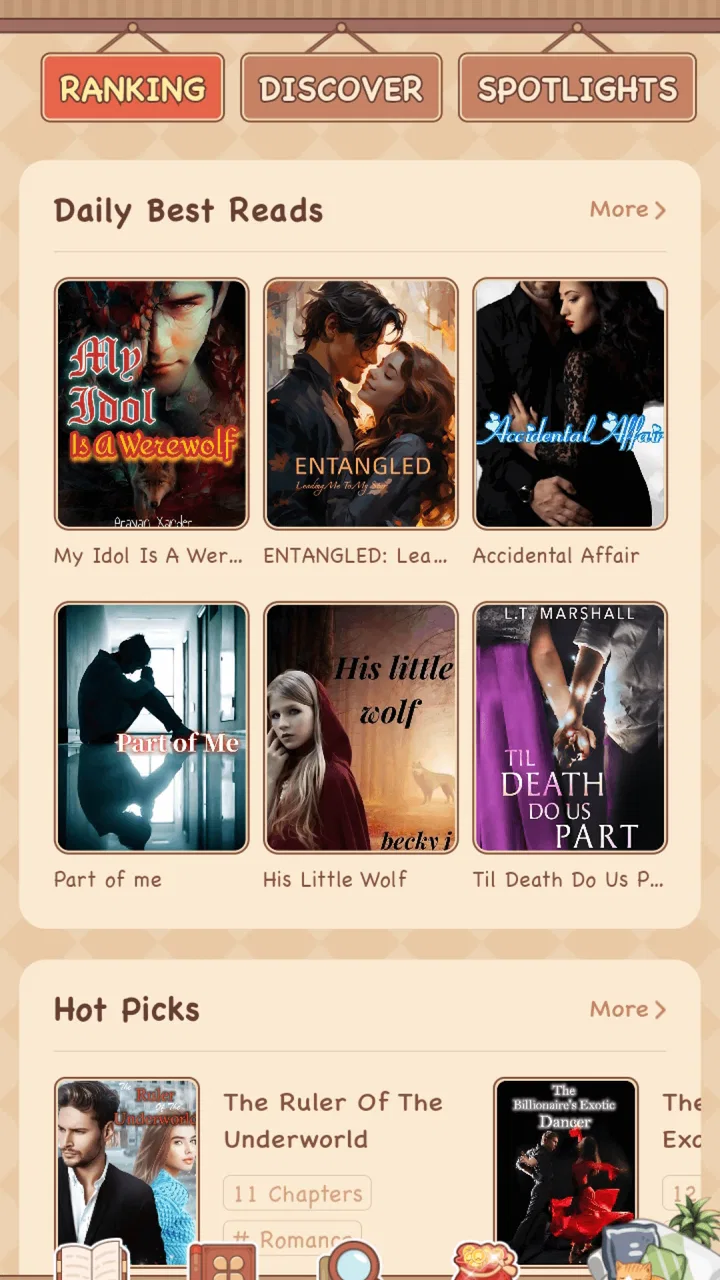
MeowFic-Read What You Love is a mobile reading platform focused on serialized fiction, especially romance, fantasy, drama, and other story-driven genres. After exploring the app, I found that its main experience revolves around browsing recommended titles, opening chapters, and following ongoing stories. The catalog can vary by region and may include both free chapters and content that requires additional access.
02Is MeowFic-Read What You Love free to download and use?
The application can generally be downloaded without paying, but that does not necessarily mean every story or chapter is free. Many reading apps use a mixed model in which selected chapters are available at no cost while later chapters may require coins, credits, subscriptions, or other in-app purchases. Before reading extensively, check the title’s access rules and the app’s payment information.
03What kind of books and stories can I read on MeowFic?
MeowFic is designed for readers who enjoy quick, episodic fiction rather than traditional standalone books. Its selection may include romance, billionaire and contemporary drama, fantasy, supernatural fiction, mystery, and other popular web-fiction categories. Since stories can be updated regularly, the available library may change over time. Use the categories, search tools, and recommendations to find suitable titles.
04Does MeowFic require an account or an internet connection?
Some features may be accessible immediately after installation, but creating or using an account can be necessary for saving reading progress, synchronizing your library, receiving recommendations, or continuing across devices. An internet connection is normally needed to load the catalog and retrieve chapters. Offline reading availability, if offered, may depend on the specific title, account status, or downloaded content.
05Are there any important privacy or purchase considerations before downloading MeowFic?
Before installing MeowFic, review the permissions, privacy policy, and in-app purchase details shown on the official store page. Reading platforms may collect information related to account activity, device data, preferences, and usage. If the app offers coins or subscriptions, confirm the price, renewal terms, and cancellation method. Parents should also review story themes and age guidance before allowing younger readers to use it.
Pros
- Large selection of romance
- fantasy
- and serialized fiction
- Personalized recommendations make discovering stories easier
- Offline reading is convenient for commutes and travel
- Regular updates keep ongoing stories fresh
- Simple reading interface is comfortable on mobile screens
Cons
- Some chapters or stories may require in-app purchases
- Story quality can vary between different authors
- Frequent notifications may feel distracting
- Offline access may be limited for certain content
- The app may use considerable storage for downloaded chapters

MeowFic-Read What You Love
Gallery